

Pictures are an extremely flexible type of media. They can convey information alone and as a group, for example, in a collection of photos or a film composed of several images. With several choices for converting photos to video, the image sequence is beneficial when you display many images simultaneously.
Therefore, you can convert your JPG or PNG files to MP4 files using a video editor. The benefit of this approach is that you may make any kind of video, depending on the editor’s characteristics. For instance, you can create a video instructional with illustrations and explanations using the voice-over recording option or adding text and figures. You can use various technologies to make better videos from picture sequences.
In this article, we will compare the best tools for image sequence to video: Filmora vs Clideo.
Part 1: Overview of Filmora and Clideo for Image Sequence to Video
The image sequence is a collection of separate photos organized by time. These photos show the frames of a video. These photos are presented in a fast sequence and provide a motion effect. So, if you’re wondering which program is superior to Filmora or Clideo for creating videos from picture sequences, we’ve got you covered.
Both of these products provide comparable functionality but take a different approach. While Filmora prioritizes user experiences and its numerous pro features, Clideo focuses on functions, including more basic capabilities.
Filmora Image Sequence
Wondershare Filmora is a flexible video editing program for every type of editor. A library of pre-installed effects and transitions, drag-and-drop editing, and compatibility for 4K and other high-resolution formats are just a few of its many potent features.
Creating and editing films is made simple by Filmora’s user-friendly interface, and its comprehensive toolkit enables acceptable customization and polished outputs. Due to its price and frequent improvements, it is a well-liked option for effectively producing high-quality films.
Filmora is the most excellent choice if you’re searching for a dependable, easy-to-use solution to convert image sequences to video. Animations and time-lapses may be made by importing a sequence of sequentially labeled picture files, which are then automatically put together into a video clip.
Features of Image Sequence in Filmora
Here are some features of the Filmora image sequence that you can use when making a video.
- Filmora has several cloud interfaces that allow you to import photographs straight from Google Photos, Google Drive, Dropbox, or OneDrive in seconds without downloading them to your computer first.
- You can change the length, position, rotation, and opacity and add effects to improve and alter imported image sequences.
- Image sequence in Filmora allows you to save your finished movie in whichever format you require, whether MP4 or GIF, ensuring compatibility with as many systems as possible.
Clideo
Clideo is an online video editing tool that offers beginner content creators a simple interface for modifying their films. It runs online, is accessible from any device with an internet connection, and storage is managed in the cloud.
It provides various easy editing options that allow users to deal with nearly any video, picture, or GIF file. The program has a valuable collection of editing tools such as combining, pressing, resizing, slide show, and image sequence to video. The free edition of Clideo gives you access to most of its functionality but adds a watermark to downloaded movies.
Features of Image Sequence in Clideo
Here are some features of Clideo:
- You can effortlessly save your films to Clideo’s cloud storage for convenient access.
- You can adjust the frame rate per second (FPS) To change the movie’s pace. FPS refers to how many frames you want to show per second. The higher the FPS, the smoother the video will be.
- You can also shuffle the images randomly or reverse their order.
Part 2: Key Differences Between Filmora and Clideo for Image Sequence Videos
Here, we will discuss some key differences between Clideo and Filmora image sequence to video so that you can quickly identify which tool is best for your needs and what your requirements are.
Ease of Use:
Filmora and Clideo are both very easy to use. Users can’t tell a difference which one is hard to use. However, Filmora looks more professional and user-friendly because of its professionally designed video editing panel.
On the other hand, Clideo’s interface is poorly designed; even though all the features are easily accessible, the impression of the interface is not so good.
Customization Options:
Clideo’s features are pretty simple. There is little AI automation to optimize operations, and the customization choices for text and visuals are relatively limited. These design limitations will be significant if you want to generate the best image sequence video.
Filmora, on the other hand, offers a wide range of features and customization possibilities, such as AI, music generation, smart cutout, motion tracking, and many more. So, if you want more customization possibilities and the freedom to create videos your way, Filmora is the way to go.
Performance:
Even with many photographs, Filmora’s image sequence function processes them swiftly. It guarantees a lag-free and stutter-free playback experience.
Clideo, on the other hand, takes advantage of cloud-based processing to prevent the overuse of your computer’s resources. Additionally, it can handle high-resolution photos and lengthy image sequences without experiencing noticeable performance decreases.
Output Quality and Export Options:
Both have fantastic output quality. However, Filmora is more powerful here than Clideo because Clideo does not have many Export options. In Filmora, you can change the video’s frame rate, resolution, and format.
Part 3: How to Create an Image Sequence Video in Filmora and Clideo
Creating image sequences for video is very easy if you have the right tool. It can be done in no more than a few steps. Below, we will show you how to use both tools.
Filmora Step-by-Step Guide
Here is the complete method of converting image sequence to video with Filmora.
- Step 1: Install the Filmora
First, install Filmora on your device by downloading it from the official website. - Step 2: Start a New Project
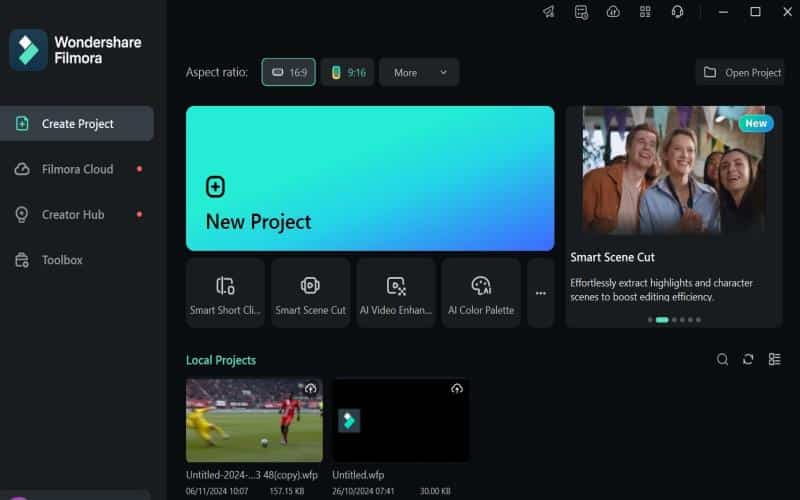
After launching Filmora and selecting the video’s aspect ratio, click New Project. - Step 3: Import Image Sequences
First, name all the series’ photographs (01, 01, 03, etc.) and place them in a single folder. In Filmora, select the “Import” option. Now, you must click on the first image and then check the image sequence option to start making a video.

- Step 4: Add To Timeline
Drag and drop the picture sequence files onto the timeline.

- Step 5: Export Your Video
After choosing your preferred video format and frame rate, click the “Export” option. Select “Export” to save the project.
Clideo Step-by-Step Guide
Here is the complete method of converting image sequence to video with Clideo.
- Upload Your Images
First things first, navigate to Clideo’s Image to Video merger. This is accessible from any device that has a web browser. Select the “Choose files” option to upload photographs from your browser, Google Drive, or Dropbox. - Edit the Image Sequence
You will be redirected to the editing page after that. Here, you will find your pictures, which you can easily organize using drag-and-drop. You may also adjust the video’s parameters, add music, etc. - Start Image Sequence to Video
Click “Merge” after you’re satisfied with the changes. Clideo will begin operating in a few seconds, and the video will be complete. - Download the Video
Click the “Download” option to save the video. You still have the option to save it straight to your Google Drive or Dropbox account.
Conclusion
Clideo and Filmora can convert photos into films, but Filmora’s image sequence is superior in many ways. Its AI-smart features, intuitive navigation, and further customization possibilities make it a top pick. It’s a pleasure to use Filmora because of its elegant and polished UI.
Additionally, even with lengthy picture sequences, it is quick and effective. Although Clideo’s cloud-based processing is satisfactory, its export choices and feature set are restricted. Filmora is ideal for editors who desire quality and control.
